
What Are Over-The-Air Updates and Why They Matter for React Native
What OTA updates are, how they work in React Native, and a pricing comparison between Turbopush and Expo Updates to help you choose the right platform.
Imagine shipping a critical bug fix and having it reach users in minutes, not days. That's the power of Over-The-Air (OTA) updates, and it's changing how mobile developers ship software.
Here's what you'll get: what OTA updates are, how they work in React Native, and a real pricing comparison between Turbopush and Expo Updates.
What Exactly Are OTA Updates?
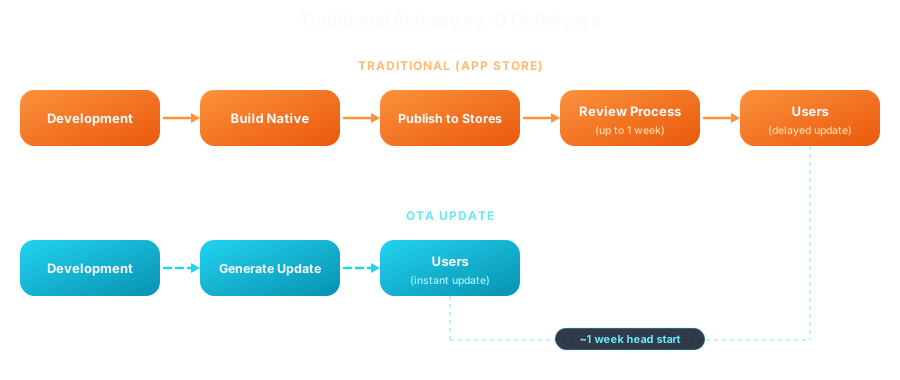
OTA updates let you push new code straight to users' devices, no app store submission required. No new binary, no review, no waiting on users to update. You deploy, and it's live.
Think of it like deploying a website. Push a change, and users see it on their next visit. OTA updates bring that same workflow to mobile.
| Can Update with OTA ✅ | Cannot Update with OTA ❌ |
|---|---|
| JavaScript code and logic | Native code (Swift, Kotlin, Objective-C, Java) |
| React components and screens | Native dependencies and libraries |
| Styles and layouts | App permissions and capabilities |
| Images and assets bundled with your code | App Store metadata (name, icon, screenshots) |
How OTA Updates Work in React Native
React Native apps are really made of two parts: the native shell (compiled code on the device) and the JavaScript bundle (your React components, logic, and UI). That split is what makes OTA updates possible.
Your JS code gets bundled into a single file that the native shell loads at runtime. So what happens when you ship an update?
Your user installs the app. It ships with a native shell and a JavaScript bundle, straight from the App Store.
The app checks in. Every time it launches, it asks your OTA server: "Got anything new for me?"
It downloads quietly. If there's a new bundle that's compatible with the native shell, it grabs it in the background, and your user won't notice a thing.
It applies the update. The new bundle swaps in, either immediately or the next time the app restarts.
It has your back if something breaks. If the new bundle crashes, most OTA systems roll it back to the last working version automatically. No hotfix scramble, no support tickets.
This is why React Native suits OTA updates so well. A fully native app means recompiling and resubmitting for every change. Here, you just push JavaScript, and it reaches your users without them lifting a finger.
Why OTA Updates Matter
1. Speed to Market
Ever waited on an App Store review while a bug burns through your users' trust? Reviews take anywhere from 24 hours to several days, and for a critical fix, that delay costs you users and revenue. OTA updates skip the wait: deploy a fix in seconds, not days.
2. Reduced User Friction
Not everyone updates their apps. Some disable auto-updates, some ignore the notification, most just forget. OTA updates sidestep all that: users get the latest version either way.
Remember that ~1 week head start from earlier? This is where it comes from: every one of these reasons ties back to skipping the app store's review queue.
3. A/B Testing and Feature Flags
Want to try a new feature on 10% of your users before betting the whole app on it? Most OTA platforms give you rollout controls for exactly that: ship gradually, watch what happens, roll back instantly if it goes sideways.
4. Emergency Response
When production breaks, every minute matters. You don't want to be refreshing App Store Connect hoping for approval. With OTA, you just ship the fix.
What is Turbopush?
Turbopush is an Over-The-Air update platform built for React Native. Bare React Native or Expo, it drops into your existing workflow without a fight.
Key features:
- Universal React Native support: Works with bare React Native, Expo, and the New Architecture (Fabric + TurboModules)
- Gradual rollouts: Release to 10%, 50%, or any percentage of users before going full
- Instant rollbacks: Revert problematic updates with a single command
- Rich analytics: Track install rates, version adoption, and user metrics in real-time
Pricing Comparison: Turbopush vs Expo Updates
Picking an OTA platform comes down to price eventually. Let's put Turbopush and Expo Updates (EAS Update) side by side across a few app sizes.
Real-World Scenarios
Here's how the two platforms compare at different stages of growth: Turbopush is up to 94% cheaper than Expo Updates.
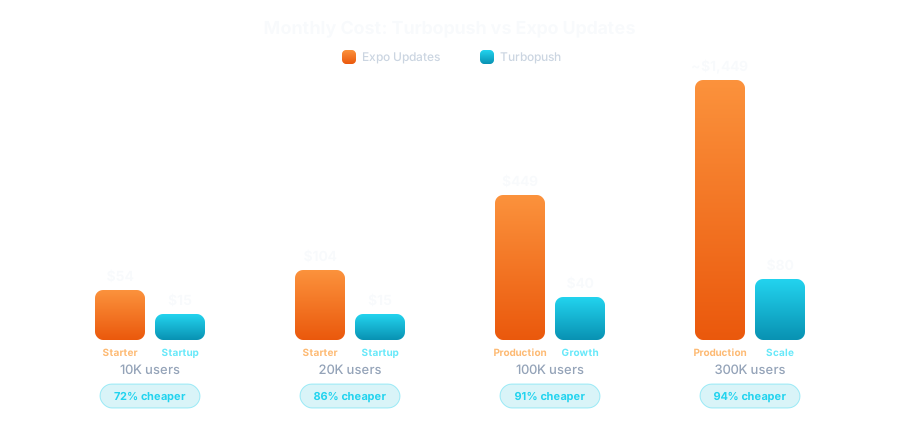
Expo's overage fees kick in the moment you cross a plan's MAU limit. Turbopush just needs one plan whose allowance covers you, no per-user math required.
Understanding the Pricing Models
Both platforms charge by Monthly Active Users (MAUs): unique users who receive at least one update per billing period, no matter how many times they update. The difference is how much MAU you get per dollar, and what's included on top. Here's the full breakdown:
No Hidden Costs: Storage & Bandwidth Included
One overlooked part of OTA pricing is storage and bandwidth. Most OTA platforms, including Expo Updates, charge extra for both. Spoiler: Turbopush doesn't.
- Storage: $0.05 per GB after your plan's limit (20 GB on Starter, 1 TB on Production)
- Bandwidth: $0.10 per GB after your plan's limit (10 GB on Starter, 100 GB on Production)
These costs add up fast, especially with bundled assets or frequent updates to a large user base. A single 5 MB update to 100,000 users burns ~500 GB of bandwidth. That's $40 alone, on top of your base plan.
Turbopush doesn't charge for storage or bandwidth on any plan. No surprise charges, no metering bundle sizes, no counting assets. Your monthly cost is exactly what you see, nothing more.
Getting Started with Turbopush
Ready to try it yourself? Setting up Turbopush takes less than 30 minutes. Our step-by-step guide walks you through creating your account, installing the SDK, configuring your app, and shipping your first update.
We've got dedicated guides whether you're on bare React Native or Expo.
Read the Getting Started Guide →
Conclusion
OTA updates change how you ship mobile apps. Decouple your JavaScript from app store releases, and you get the speed and flexibility web developers have had for years.
Whether you're squashing a bug, testing a feature, or just iterating faster, OTA updates remove the friction. With pricing this generous, there's not much reason to wait.
The question isn't whether you should use OTA updates. It's how fast you want to get started.
Ready to ship faster?
Happy shipping! 🚀
How is this guide?
Ship Expo Updates (OTA) in Minutes — Turbopush Guide
Step-by-step guide to OTA updates in your Expo app with Turbopush — a cost-effective alternative to EAS Updates with gradual rollouts and instant rollbacks.
Web Deploys vs React Native: Mobile Is Stuck in 2010
Web developers deploy dozens of times a day. Mobile developers wait days. Discover how the two worlds drifted apart and how OTA updates are closing the gap.